Kasa Smart Video Doorbell Camera Review: Step-by-Step Guide
Your front door deserves better protection. Every visitor, every delivery, and every unexpected guest should be captured in crystal clear detail. The Kasa Smart Video Doorbell Camera offers exactly that without breaking your budget.
This review explores why this affordable doorbell camera has become a favorite among homeowners who want premium features without premium prices.
Smart doorbells have changed how we protect our homes. You get instant alerts when someone approaches your door. You can see and speak to visitors from anywhere.
Key Takeaways:
- Crystal Clear 2K Resolution: The Kasa KD110 captures every detail with its 3MP camera and 2304 x 1296 resolution. You can zoom in on packages, faces, and license plates without losing clarity. The 160-degree field of view covers your entire porch from corner to corner.
- Night Vision That Actually Works: Unlike basic doorbells that show grainy darkness, this camera uses 850nm infrared LEDs to illuminate your doorstep up to 30 feet away. You see visitors in black and white clarity even at midnight.
- Two-Way Communication: Talk to delivery drivers, greet guests, or warn unwanted visitors through the built-in speaker and microphone. The audio quality stays clear without echo or delay.
- Smart Detection Without Monthly Fees: The doorbell uses AI person detection to tell the difference between people and passing cars. You get alerts that matter, not false alarms from every leaf that blows by. No subscription required for basic features.
- Flexible Storage Options: Save recordings to a microSD card up to 128GB locally, or subscribe to Kasa Care for cloud storage. You control where your footage lives and who can access it.
- Easy Installation with Included Chime: The package includes everything you need: the doorbell camera, a wireless chime, mounting hardware, and clear instructions. Connection requires existing doorbell wiring (16-24V AC, 10VA minimum).


Kasa Smart Video Doorbell Camera: What Makes It Special
The Kasa Smart Video Doorbell Camera stands out in a crowded market for good reasons. This device combines professional-grade features with consumer-friendly pricing. TP-Link, the company behind Kasa, built a reputation for reliable networking equipment. They brought that same engineering expertise to home security.
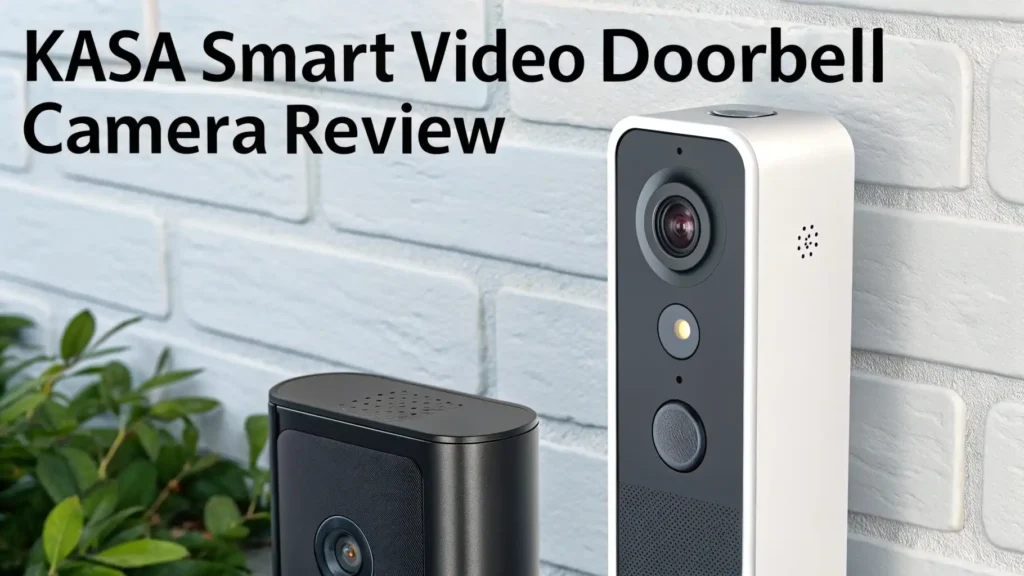
The doorbell measures just a few inches tall but packs serious technology inside. The weatherproof housing protects against rain, snow, and extreme temperatures. The sleek black finish matches most home exteriors without looking like an obvious security camera. Installation takes about 30 minutes with basic tools.
What really sets this doorbell apart is the value proposition. You get features found in doorbells costing three times as much. The 2K resolution outperforms many competitors. The AI detection works reliably. The wireless chime eliminates the need for complicated wiring throughout your house.
Picture Quality That Captures Every Detail
Video quality makes or breaks a doorbell camera. The Kasa delivers 2304 x 1296 resolution at 15 frames per second. This translates to sharp, clear footage whether someone stands two feet or twenty feet from your door. The 3-megapixel sensor captures accurate colors during daylight hours.
The 160-degree diagonal field of view provides excellent coverage. You see the entire porch, steps, and part of your driveway. Most doorbells offer 120-140 degrees, which often misses packages left to the side. This extra width prevents blind spots where someone could hide.
Image quality remains consistent across different lighting conditions. The doorbell automatically adjusts exposure when bright sunlight hits the lens. It smoothly transitions to night vision as darkness falls. The footage maintains enough detail that you can identify faces clearly and read text on packages.
Night Vision Technology Explained
Many cheap doorbells claim night vision but deliver murky gray footage. The Kasa uses 850nm infrared LEDs that illuminate without visible red glow. These LEDs reach 30 feet, covering most front yards and driveways. The IR-cut filter automatically switches between day and night modes.
Night vision produces black and white images with excellent contrast. You clearly see facial features, clothing details, and moving vehicles. The system works even in complete darkness. Street lights or porch lights improve the image further but aren’t required.
The automatic day/night switching happens smoothly without delays. You never get stuck in the wrong mode during sunset or sunrise. The camera senses ambient light levels and adjusts instantly. This means you always get the best possible image quality regardless of time.
Two-Way Audio Communication Features
The built-in speaker and microphone let you have natural conversations through your phone. Audio quality sounds clear and natural without robotic distortion. The system includes noise cancellation that filters out background sounds like traffic or wind.
Talk to delivery drivers to give special instructions. Greet guests when you’re running late to the door. Warn suspicious people that you’re watching. The audio works both ways with minimal delay. You hear what they say, and they hear your response almost instantly.
Volume adjusts through the Kasa app. You can make the speaker louder if you have a large porch or quieter for nighttime conversations. The microphone picks up normal speaking voices clearly from six to eight feet away. People don’t need to shout to be heard.
Top 3 Alternatives for Kasa Smart Video Doorbell Camera


Smart Detection and AI Features
Person detection uses artificial intelligence to identify human shapes and movements. This reduces false alerts from cars, animals, and moving shadows. The system learns over time and becomes more accurate at distinguishing people from other objects.
You receive real-time notifications on your smartphone when someone approaches. These alerts include a snapshot of what triggered the detection. You can customize detection zones to ignore busy sidewalks or streets. This focuses alerts on areas that matter like your porch or driveway.
The AI works locally on the device without sending constant data to cloud servers. This improves privacy and response time. Detection happens in seconds rather than minutes. You get alerted while the person still stands at your door, not after they’ve already left.
Storage Options and Recording
The Kasa supports dual storage methods for maximum flexibility. Insert a microSD card up to 128GB for local recording. This stores days or weeks of footage depending on activity levels. You control the footage completely without monthly fees.
Cloud storage requires a Kasa Care subscription. Plans start affordably and provide encrypted storage for 30 days of video clips. Cloud storage lets you access footage from anywhere even if someone steals the doorbell. Both storage methods can work simultaneously.
Continuous recording saves everything to your microSD card around the clock. The system also creates event-based clips when motion or people are detected. These clips are easier to review than scanning hours of footage. The app organizes clips by date and detection type.
Installation Process and Requirements
Installation requires existing doorbell wiring between 16-24V AC with at least 10VA output. Most homes have this standard voltage. You’ll need a screwdriver, drill (possibly), and about 30 minutes. The Kasa app provides step-by-step instructions with pictures.
First, turn off power at your circuit breaker. Remove your old doorbell and disconnect the wires. Mount the included bracket using the provided screws. Connect the wires to the Kasa terminals. Attach the doorbell to the bracket and turn power back on.
The wireless chime plugs into any outlet and pairs automatically. No additional wiring needed. The chime plays one of eight selectable ringtones at adjustable volume. You can place chimes in multiple rooms for whole-house coverage. Each chime costs extra but provides good value.
Mobile App Experience and Controls
The Kasa Smart app works on iOS and Android devices. The interface feels intuitive and responsive. You see a live feed from your doorbell with minimal delay. Tap the screen to activate two-way audio. Swipe to access recorded clips and settings.
Live view loads in two to three seconds over WiFi. Quality adjusts automatically based on your internet speed. You can manually select resolution to save data on cellular connections. The app shows battery status (for chime), WiFi strength, and firmware version.
Customize notification preferences for different times of day. Turn off alerts during work hours or while sleeping. Set detection zones by drawing boxes on your camera view. Adjust motion sensitivity from low to high. All settings sync across multiple devices logged into your account.
Smart Home Integration
The Kasa doorbell works with Amazon Alexa and Google Assistant. Use voice commands to view the live feed on smart displays. Say “Alexa, show me the front door” to see who’s there. Announcements can play on smart speakers when someone presses the doorbell.
Integration extends to smart home routines. Turn on porch lights when motion is detected. Unlock smart locks when you identify visitors through the camera. These automations require compatible devices but add powerful convenience.
The system does NOT work with Apple HomeKit currently. This limits options for Apple-focused smart homes. However, the Kasa app provides full functionality even without HomeKit support. IFTTT compatibility adds some cross-platform automation possibilities.
Battery Life and Power Management
The Kasa KD110 requires hardwired power and doesn’t use batteries. This means continuous operation without recharging interruptions. The doorbell draws minimal power and won’t increase your electricity bill noticeably.
The included wireless chime runs on standard outlet power. No batteries to replace or recharge. The chime stays connected continuously and responds instantly when someone presses the doorbell. Multiple chimes can connect to one doorbell.
Power requirements are standard 16-24V AC transformers found in most homes built after 1990. Older homes might need a transformer upgrade. The doorbell includes a built-in voltage checker during setup. This confirms your wiring provides adequate power before installation completes.
Weatherproof Design and Durability
The Kasa doorbell carries an IP65 weatherproof rating. This means complete protection against dust and water jets from any direction. The device handles rain, snow, humidity, and extreme temperatures without issues.
Operating temperature ranges from minus 4 degrees to 122 degrees Fahrenheit. This covers most climates from northern winters to desert summers. The lens includes a protective coating that resists water spots and dirt buildup. An occasional wipe keeps the view clear.
The mounting bracket holds firmly against wind and vibration. Tamper-resistant screws prevent easy removal. The black finish resists fading from sun exposure. After months of outdoor use, the doorbell maintains its appearance without discoloration or corrosion.
Value for Money Analysis
At under $50 regular price, the Kasa delivers exceptional value. Compare this to Ring or Nest doorbells costing $100-200 with required subscriptions. The Kasa includes a wireless chime that competitors charge extra for. No mandatory monthly fees means long-term savings.
The 2K resolution matches or exceeds more expensive models. The 160-degree view provides better coverage than many premium doorbells. AI person detection works without subscriptions unlike some brands that lock this feature behind paywalls.
Free cloud storage for recent clips provides basic coverage. The ability to use local microSD cards eliminates ongoing costs entirely. For budget-conscious buyers who want quality features, this doorbell offers unmatched value.
Common Issues and Limitations
The doorbell requires 2.4GHz WiFi only. It won’t connect to 5GHz networks. Most routers broadcast both frequencies, so this rarely causes problems. However, homes with mesh systems on 5GHz only need adjustments.
Some users report delayed notifications of 3-5 seconds. This beats older models but falls behind premium options with 1-2 second alerts. The delay rarely matters for practical purposes but isn’t instant.
The device lacks continuous cloud recording. You only get event clips saved to the cloud. Continuous recording requires a local microSD card. This limitation matches most competitors in this price range.
Package detection works less reliably than person detection. The camera sees packages but doesn’t always categorize them correctly. You still get motion alerts but might not get specific package notifications.
How Does Kasa Compare to Competitors?
Ring doorbells offer more polished apps and better smart home integration. However, they require subscriptions for most features and cost twice as much. Ring has name recognition but the Kasa provides similar core functions for less money.
Blink Video Doorbells offer battery operation and Amazon Alexa integration. They cost slightly less but provide lower resolution and fewer features. Blink works well for basic needs but lacks the video quality of the Kasa.
Wyze doorbells match Kasa on price and features. Both offer excellent value. Wyze provides more frequent updates and experimental features. Kasa offers more stable performance and better build quality. Either choice satisfies budget-conscious buyers.
Arlo and Nest represent premium options with superior apps and ecosystems. They cost significantly more and require subscriptions. Choose these if money isn’t a concern and you want the absolute best integration and support.
Frequently Asked Questions
Does the Kasa doorbell work without WiFi?
The doorbell requires WiFi for notifications and remote viewing. Without WiFi, it still functions as a traditional doorbell and chime. You won’t get smartphone alerts or access recordings. The device cannot operate completely offline for smart features.
Can I use the Kasa doorbell with my existing chime?
Yes, the doorbell can trigger mechanical chimes with proper wiring. The included wireless chime provides additional convenience. You can use both simultaneously. Some digital chimes might not work without an adapter.
How long does video footage stay saved?
Local microSD card footage stays until the card fills up, then overwrites oldest recordings. Cloud storage with Kasa Care subscription saves clips for 30 days. Free cloud storage keeps recent clips for 24-48 hours.
What happens if my power goes out?
The doorbell stops working during power outages since it requires hardwired power. When power returns, the device reconnects automatically. Recent cloud clips remain accessible through the app even during outages.
Is professional installation required?
Most homeowners can install this doorbell with basic DIY skills. The app provides detailed instructions. Professional installation costs $50-100 if you prefer expert setup. Electricians can install it in 15-20 minutes.
Can multiple people access the doorbell camera?
Yes, you can share access through the Kasa app. Family members create their own accounts and receive shared access. Each person gets their own login and notification settings. The owner controls access permissions.
Does the doorbell record continuously?
Yes, with a microSD card installed, the doorbell records 24/7. Cloud storage only saves event-triggered clips. Continuous recording fills a 128GB card in several days depending on activity levels and quality settings.
Will this work with my transformer?
The doorbell requires 16-24V AC with at least 10VA output. Most modern homes have compatible transformers. The app tests voltage during setup and warns if power is insufficient. Older homes might need transformer upgrades available for $15-20.