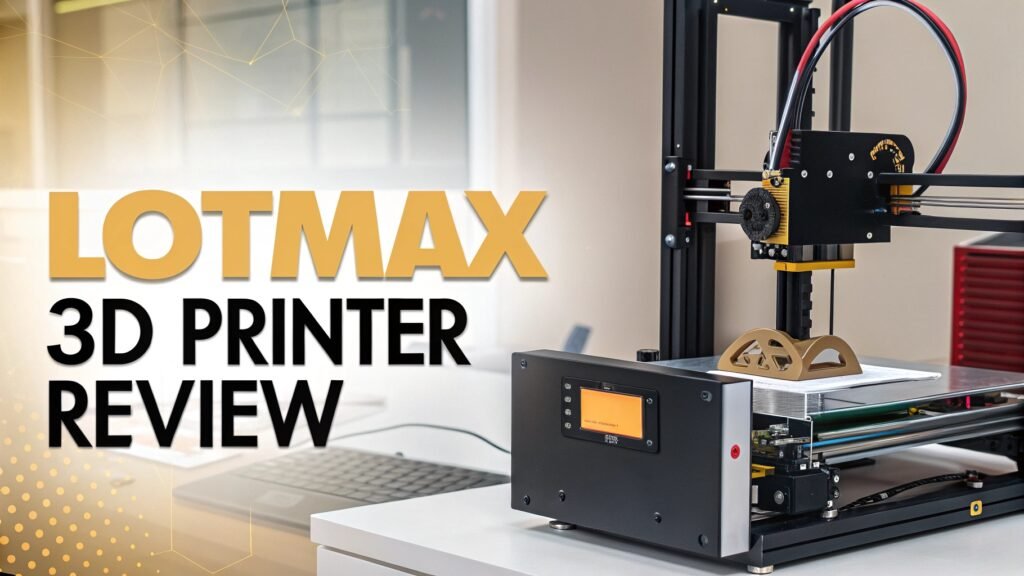
Lotmaxx 3D Printer Review: Complete Guide
The world of 3D printing has become more accessible than ever, with manufacturers offering feature-rich printers at competitive prices.
Lotmaxx stands out as a brand that delivers exceptional value through innovative designs and multi-functional capabilities.
This comprehensive review examines the best Lotmaxx 3D printers available on Amazon, helping you make an informed decision for your next 3D printing investment.
Key Takeaways
- Multi-functional Design: Lotmaxx printers excel at combining 3D printing with laser engraving capabilities in single machines, offering exceptional value for makers who want versatile tools
- Dual Extruder Innovation: The unique two-in-one-out dual extruder system allows multi-color printing without complex calibration issues found in traditional dual-nozzle setups
- Beginner-Friendly Assembly: Most Lotmaxx models arrive 95% pre-assembled, requiring only 15-20 minutes of simple setup, making them perfect for newcomers to 3D printing
- Strong Build Quality: Features like silent TMC stepper drivers, aluminum frame construction, and auto bed leveling deliver professional results at consumer prices
- Software Compatibility: Full integration with popular slicing software like Ultimaker Cura ensures easy file preparation and extensive community support
- Safety Considerations: Laser engraving modules require proper safety equipment and ventilation, with included safety goggles being essential for safe operation


Lotmaxx Shark V2 Review: The Ultimate Multi-Function 3D Printer
The Lotmaxx Shark V2 represents the pinnacle of multi-functional 3D printing technology. This impressive machine combines dual extruder 3D printing with laser engraving capabilities in a single, well-designed package. The printer features a substantial 235 x 235 x 265mm build volume, making it suitable for both small detailed parts and larger functional prints.
The unique dual extruder system sets this printer apart from competitors. Instead of using two separate nozzles that require complex calibration, the Shark V2 employs a clever two-in-one-out design where both filaments feed through a single nozzle. This innovation eliminates offset calibration issues while maintaining the ability to print multiple colors or materials simultaneously.
Build quality impresses with a rigid aluminum frame constructed from distinctive grey aluminum extrusions. The frame provides excellent stability during printing, while TMC2208 silent stepper drivers ensure whisper-quiet operation suitable for office or home environments. The 290W power supply heats both the extruder and heated bed rapidly, reducing wait times between prints.
The included 1600mW laser engraver adds significant versatility, capable of engraving wood, leather, paper, and other materials. While the engraving speed could be faster, the quality of engravings on wood produces impressive results with proper safety precautions.
Lotmaxx Shark V3: Advanced Features and Improvements

The Shark V3 builds upon the successful V2 design with notable improvements in auto bed leveling and overall user experience. This latest iteration maintains the dual-color printing and laser engraving capabilities while adding enhanced automation features that make operation even more straightforward.
Auto bed leveling represents a major advancement, eliminating the tedious manual calibration process required by earlier models. The system automatically compensates for bed irregularities, ensuring consistent first layer adhesion across the entire build surface. This feature particularly benefits beginners who struggle with manual bed leveling procedures.
The print quality shows marked improvement over the V2, with better layer consistency and reduced color bleed in dual-extruder prints. Enhanced purge tower settings provide cleaner color transitions, while improved cooling ensures better overhangs and bridging performance.
Software integration remains excellent with full Cura compatibility and pre-configured profiles that deliver good results straight from installation. The removable touchscreen display continues to be a standout feature, allowing users to monitor and control prints while working away from the machine.
Build Quality and Design Excellence
The construction quality of Lotmaxx printers consistently impresses across all models. The aluminum frame construction provides exceptional rigidity while maintaining reasonable weight for desktop use. Industrial-grade linear bearings ensure smooth motion on all axes, contributing to precise print quality and long-term reliability.
Component selection demonstrates attention to detail, with high-quality stepper motors, precision-machined parts, and durable electronics throughout. The heated aluminum build plate with magnetic flexible steel sheets offers excellent adhesion and easy part removal. The textured surface works particularly well with PLA and PETG filaments without requiring additional adhesion aids.
Cable management shows thoughtful design, with clean routing that prevents interference with moving parts. The modular design allows easy maintenance and upgrades, while standardized components ensure replacement parts remain readily available.
Cooling systems receive special attention, with dual part cooling fans and dedicated hotend cooling maintaining optimal temperatures during extended printing sessions. The low-noise fans complement the silent stepper drivers for exceptionally quiet operation.
Dual Extruder System Performance
The innovative dual extruder design represents Lotmaxx’s most significant technical achievement. Traditional dual extruder systems require complex calibration to align two separate nozzles, often resulting in offset issues and inconsistent layer bonding between materials.
Lotmaxx solves these challenges through their two-in-one-out system, where both filaments feed into a single heated chamber and nozzle. This design eliminates nozzle offset calibration while maintaining full dual-material capabilities. The system works particularly well for multi-color printing, producing clean color transitions with proper purge tower settings.
Material compatibility includes all standard 1.75mm filaments, with successful results using PLA, PLA+, ABS, and PETG. Both extruders must use compatible materials since they share the same heating element, preventing combinations like PLA with high-temperature materials like ABS in the same print.
Purge tower optimization becomes crucial for clean color transitions. The default settings work well for simple models, but complex geometry with frequent color changes benefits from increased purge volumes and larger prime towers. This adjustment increases material usage but significantly improves print quality.
Top 3 Alternative for Lotmaxx 3D Printer


Laser Engraving Capabilities and Safety
The integrated laser engraving functionality adds tremendous value for makers interested in mixed-media projects. The 1600mW 445nm laser provides sufficient power for engraving wood, leather, paper, and thin plastics with impressive detail and precision.
Safety considerations require serious attention when using laser functionality. The included safety goggles are mandatory during operation, as direct laser exposure can cause permanent eye damage instantly. Proper ventilation is essential to remove smoke and particles generated during engraving, particularly when working with synthetic materials.
Engraving quality produces excellent results on natural wood, creating deep, precise lines with good contrast. Speed optimization remains an area for improvement, as default settings prioritize quality over speed. Advanced users can adjust parameters through G-code editing to achieve faster engraving speeds while maintaining acceptable quality.
Software options include Lotmaxx’s basic engraving software and compatibility with advanced programs like LightBurn. Professional software provides better control over engraving parameters, preview capabilities, and support for complex vector graphics.
Print Quality and Performance Analysis
Layer adhesion consistently impresses across all Lotmaxx models, with strong interlayer bonding that produces durable functional parts. The heated bed and quality extruder design ensure consistent material flow and even heating throughout the printing process.
Dimensional accuracy meets expectations for desktop FDM printers, with ±0.1mm precision achievable on most features. Fine details reproduce well at 0.15mm layer heights, while 0.2mm layers provide the best balance of quality and speed for most applications.
Surface finish benefits from optimized cooling and precise motion control. Overhangs up to 45 degrees print successfully without supports, while bridging performance handles gaps up to 15mm with minimal sagging. Stringing remains minimal with proper retraction settings.
Speed capabilities vary by complexity, with simple geometries printing successfully at 60-80mm/s while detailed models benefit from slower speeds around 45mm/s. The silent operation allows printing in noise-sensitive environments without disturbing others.
Software Integration and User Experience
Ultimaker Cura compatibility provides excellent software support with pre-configured profiles for all Lotmaxx models. These profiles deliver good results immediately while allowing advanced customization for specific applications or materials.
Slicing quality excels with optimized support generation, efficient infill patterns, and smart layer height recommendations. The dual extruder profiles include proper purge tower settings and material change sequences that work well for most multi-color applications.
User interface design on the touchscreen display emphasizes simplicity and functionality. Menu navigation feels intuitive, with large, clear buttons and logical organization. The removable display adds convenience for monitoring prints while working elsewhere.
File preparation works seamlessly with standard G-code files from any compatible slicer. SD card compatibility ensures reliable file transfer, while USB connectivity provides direct computer control for advanced applications.
Assembly Process and Initial Setup
Unboxing experience reveals careful packaging with protective foam and clear component organization. Most models arrive 95% pre-assembled, requiring only basic tools and 15-20 minutes for complete setup.
Assembly instructions provide clear step-by-step guidance with detailed photographs and helpful diagrams. Critical connections use color-coded cables and keyed connectors that prevent incorrect installation.
Initial calibration includes bed leveling assistance through automated positioning and clear instructions. The semi-automated process guides users through each calibration point while providing helpful feedback on proper adjustment techniques.
Test prints come pre-loaded on the included SD card, allowing immediate verification of printer functionality and print quality. These carefully selected models demonstrate various capabilities while identifying potential issues that require attention.
Material Compatibility and Recommendations
Filament compatibility covers all standard 1.75mm materials including PLA, PLA+, ABS, PETG, and TPU. The heated bed reaches temperatures up to 100°C, supporting materials that require elevated bed temperatures for proper adhesion.
PLA printing produces excellent results with minimal warping and strong layer adhesion. The textured bed surface provides good adhesion without requiring additional adhesives or surface treatments. Temperature settings of 200°C extruder and 60°C bed work well for most PLA formulations.
ABS printing requires higher temperatures around 240°C extruder and 80-100°C bed temperatures. Enclosure benefits become apparent with ABS, as temperature stability improves layer bonding and reduces warping on larger prints.
Specialty materials like wood-filled, metal-filled, and carbon fiber composites print successfully with appropriate temperature adjustments and hardened steel nozzles for abrasive materials.
Maintenance and Long-term Ownership
Regular maintenance requirements remain minimal with proper operation and quality materials. Monthly cleaning of the build surface and occasional lubrication of linear bearings ensures optimal performance over extended periods.
Component longevity impresses with quality parts that withstand thousands of printing hours. Nozzle replacement becomes necessary with abrasive materials, while belts and bearings typically last multiple years with normal use.
Upgrade potential allows enhancement of various systems, including nozzle upgrades, improved cooling, and advanced electronics. The standard component sizes ensure compatibility with aftermarket parts and community modifications.
Technical support from Lotmaxx provides helpful assistance with setup questions and troubleshooting guidance. Community forums offer extensive knowledge sharing and modification ideas from experienced users.
Value Proposition and Market Position
Price-to-performance ratio establishes Lotmaxx as exceptional value in the competitive 3D printer market. The combination of dual extruder capability, laser engraving, and solid build quality typically costs significantly more from other manufacturers.
Feature comparison with similarly priced competitors reveals superior included accessories, better build quality, and unique capabilities that justify the investment. Multi-functional design eliminates the need for separate laser engraving equipment.
Target audience includes educational institutions, small businesses, makerspaces, and serious hobbyists who benefit from versatile equipment that handles diverse projects without requiring multiple specialized machines.
Return on investment becomes evident quickly for users who utilize both 3D printing and laser engraving capabilities. The time savings and project flexibility often justify the initial cost within months of purchase.
Troubleshooting Common Issues
Layer adhesion problems typically stem from improper bed leveling or insufficient bed temperature. Careful calibration using the paper method and appropriate temperatures for specific materials resolve most adhesion issues.
Dual extruder color bleeding occurs when purge tower settings prove insufficient for complete material changes. Increasing purge volume and prime tower size eliminates unwanted color mixing in multi-color prints.
Laser engraving inconsistencies often result from incorrect focus distance or inappropriate speed settings. Proper focus adjustment and material-specific parameters ensure consistent engraving depth and quality.
Print quality issues like stringing and layer inconsistency respond well to retraction adjustments and temperature optimization. Systematic testing with calibration prints helps identify optimal settings for specific material combinations.
Frequently Asked Questions
What materials can I use with Lotmaxx dual extruders?
Lotmaxx dual extruders work with any combination of 1.75mm filaments that require similar printing temperatures. Popular combinations include PLA with PLA+, different colored PLAs, and PLA with wood-filled filaments. Both materials must be compatible since they share the same heating element.
How dangerous is the laser engraving feature?
The 1600mW laser poses serious eye hazards and requires mandatory safety precautions. Always wear the included safety goggles, ensure proper ventilation, and never operate the laser without supervision. The laser can cause permanent eye damage instantly upon direct exposure.
Can beginners successfully use Lotmaxx printers?
Absolutely! Lotmaxx designs emphasize user-friendly operation with 95% pre-assembly, clear instructions, and helpful automation features. Beginner-friendly features like auto bed leveling and pre-configured software profiles eliminate complex setup procedures.
What’s the difference between Shark V2 and V3 models?
The Shark V3 includes enhanced auto bed leveling, improved dual extruder performance, and better software integration. While both models offer similar build volumes and laser capabilities, the V3 provides more automated features and improved print quality.
How long does laser engraving take compared to 3D printing?
Laser engraving speed varies significantly based on complexity and settings, typically taking 2-6 hours for detailed projects. 3D printing speed depends on model size and layer height, usually faster than engraving for equivalent project complexity.
Is the dual extruder system reliable for production use?
The two-in-one-out design proves more reliable than traditional dual nozzle systems since it eliminates alignment issues. However, production use requires proper maintenance, quality materials, and optimized settings for consistent results across multiple prints.