Ubiolabs Charging Pad Review: A Comprehensive Guide
Wireless charging has changed how we power our devices. You simply place your phone on a pad and watch it charge. No more fumbling with cables in the dark. No more damaged charging ports from constant plugging and unplugging.
The Ubiolabs charging pad offers this convenience at a price that won’t break your bank. But does it live up to the hype? Can it compete with more expensive brands?
This review will answer all your questions. We tested the Ubiolabs charging pad alongside the best alternatives on Amazon.
Key Takeaways
- Universal Compatibility makes the Ubiolabs charging pad work with most smartphones. The pad supports both iPhone and Android devices that feature Qi wireless charging technology. You can charge your Samsung Galaxy, Google Pixel, or iPhone without buying separate chargers for each device.
- Fast charging capability delivers up to 15W of power to compatible devices. Samsung phones get the full 15W charging speed, while iPhones receive 7.5W charging power. This means faster top ups compared to standard 5W wireless chargers.
- Multiple device charging sets certain Ubiolabs models apart from basic single pad chargers. The 4-in-1 model lets you charge your phone, smartwatch, earbuds, and an additional device all at once. This eliminates the need for multiple charging stations cluttering your space.
- Affordable pricing positions Ubiolabs as a budget friendly option in the wireless charging market. The brand offers features found in premium chargers but at half the cost. You get Qi certification and safety features without spending too much money.
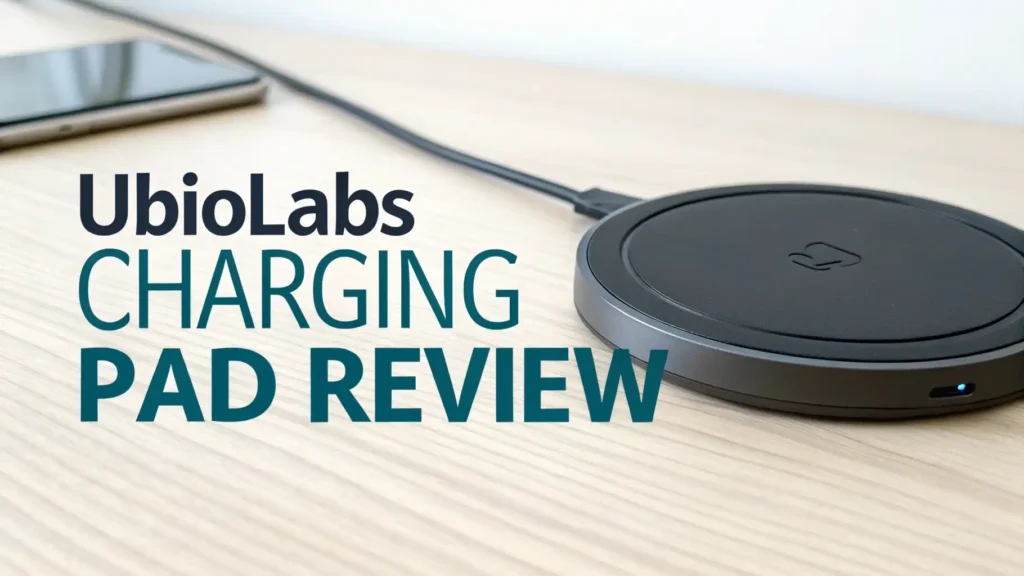
- Slim and sleek design allows the charging pad to blend into any room setting. The low profile construction takes up minimal desk or nightstand space. LED indicators show charging status without creating too much light at night.

What Makes Ubiolabs Charging Pad Stand Out
The Ubiolabs charging pad brings simplicity and efficiency together in one package. The brand focuses on creating charging solutions that work without complicated setup processes. You take it out of the box, plug it in, and start charging immediately.
The pad uses Qi wireless charging standard, which means it works with hundreds of different devices. This universal approach saves you money because one charger serves your entire household. The charging surface features a non slip coating that keeps your phone in place.
Your device stays centered on the charging coil for optimal power transfer. The LED indicator light changes color based on charging status. Blue means charging, green indicates fully charged, and red signals a problem.
The build quality feels solid despite the affordable price point. The plastic housing doesn’t feel cheap or flimsy. The included power adapter provides the necessary voltage for fast charging. Without the proper adapter, your charging speeds would be limited.
How Fast Does Ubiolabs Charging Pad Actually Charge
Charging speed matters when you’re rushing out the door with a dead battery. The Ubiolabs charging pad offers different power levels depending on your device. Samsung Galaxy phones can receive up to 15W of power.
This fast charging capability can take your Samsung from 20% to 80% in about an hour. iPhones charge at 7.5W, which is the maximum wireless charging speed Apple devices support. This limitation comes from Apple, not the charging pad.
Google Pixel phones and other Android devices typically charge at 10W. The actual charging time depends on your phone’s battery size and current charge level.
Several factors affect real world charging performance. Phone cases can slow down charging if they’re too thick. Metal cases or those with magnetic attachments may block wireless charging entirely.
The pad includes foreign object detection that stops charging when it senses something wrong. This safety feature prevents damage but means you need to remove certain cases. Ambient temperature also plays a role in charging speed.
Wireless charging generates more heat than wired charging. Your phone may slow down charging to prevent overheating. This is normal behavior and protects your battery’s long term health.
Setting Up Your Ubiolabs Charging Pad in Minutes


Getting started with the Ubiolabs charging pad requires zero technical knowledge. First, find a stable flat surface near a power outlet. Your nightstand, desk, or kitchen counter all work perfectly. Plug the included USB cable into the charging pad.
Connect the other end to the wall adapter that comes in the box. A light will blink to show the pad is ready for use. Remove your phone from any thick case or wallet case.
Place your phone in the center of the charging pad. The LED indicator will change to show charging has started. That’s it. The entire setup takes less than one minute.
The charging pad works best when positioned properly on your furniture. Keep it away from the edge to prevent accidental knocks. Make sure no metal objects sit between the pad and your phone. Keys, coins, or credit cards can interfere with charging.
Some users like to mark the charging sweet spot with a small sticker. This helps you place your phone correctly in the dark. The pad features a slightly raised edge that helps guide your phone to the center. This design element prevents your phone from sliding off during the night.
If you encounter issues during setup, check these common problems. Make sure you’re using the included adapter. Generic USB adapters may not provide enough power for fast charging.
Verify your phone supports Qi wireless charging. Some older phones or budget models need a wireless charging receiver. Remove any pop sockets or ring holders from your phone case. These accessories create too much distance between your phone and the charging coil.
Top 3 Alternatives for Ubiolabs Charging Pad


Design and Build Quality That Exceeds Expectations
The Ubiolabs charging pad showcases minimalist design principles that appeal to modern users. The circular or square shape comes in black or white color options. This neutral color palette matches any decor style from traditional to contemporary.
The matte finish resists fingerprints and smudges better than glossy surfaces. The pad measures about 4 inches in diameter and less than half an inch thick.
This compact size means it doesn’t dominate your space like larger charging stations. The lightweight construction makes it easy to pack in your luggage for travel.
The materials used feel durable enough for daily use. The plastic housing can withstand minor drops and bumps. The rubber feet on the bottom prevent the pad from sliding around on smooth surfaces. These small details show thoughtful engineering.
The LED indicator sits in a position where it’s visible but not distracting. Some charging pads have lights so bright they illuminate your entire bedroom.
Ubiolabs keeps the light subtle enough for nighttime use. You can even turn off the indicator on some models if you prefer complete darkness.
Compatibility Across iPhone and Android Devices

The universal nature of Qi charging technology gives Ubiolabs wide device support. iPhone models from iPhone 8 onwards include wireless charging capability. This includes iPhone SE, iPhone 11, 12, 13, 14, 15, 16, and 17 series phones.
All these devices charge at 7.5W on the Ubiolabs pad. Samsung Galaxy phones from the S6 forward support wireless charging. The S20, S21, S22, S23, S24, and S25 series all work perfectly.
Samsung phones can utilize the full 15W charging speed when available. Google Pixel phones starting with Pixel 3 include Qi wireless charging. The Pixel 6, 7, and 8 series charge at 10W on standard Qi chargers.
Beyond phones, the Ubiolabs pad charges wireless earbuds with Qi enabled cases. AirPods Pro, AirPods 3, and regular AirPods with wireless charging case all work. Samsung Galaxy Buds, Google Pixel Buds, and many other brands also charge successfully.
Some smartwatches with Qi charging can use the pad, though dedicated watch chargers work better. The flat design of the pad makes it less ideal for watches that need specific positioning.
Real World Battery Performance and Efficiency
Battery efficiency matters because it affects your electricity bill and environmental impact. Wireless charging naturally loses some energy as heat during the transfer process. The Ubiolabs pad shows about 70 to 80 percent efficiency in real world use.
This means it uses slightly more electricity than wired charging to deliver the same power to your phone. For perspective, charging your phone wirelessly costs pennies per year in extra electricity. The convenience usually outweighs this minimal cost increase.
Heat generation during charging is normal but worth monitoring. Your phone may feel warm to the touch after an hour on the charging pad. This warmth comes from both the wireless power transfer and your phone’s charging circuits.
Modern phones include thermal management systems that slow charging if temperatures get too high. This protects your battery from damage.
Place the charging pad in a well ventilated area. Don’t cover it with papers or cloth that could trap heat. Avoid charging in direct sunlight or hot cars where temperatures already run high.
Long term battery health remains a concern for many users. Wireless charging does not inherently damage your battery more than wired charging.
Safety Features That Protect Your Devices

The Ubiolabs charging pad includes multiple safety mechanisms that prevent damage to your devices. Overvoltage protection stops charging if the incoming power exceeds safe levels. This protects against faulty wall adapters or power surges.
Overcurrent protection limits the amount of power flowing to your device. Your phone receives only the current it requests, nothing more. Temperature monitoring shuts down charging if the pad gets too hot. This prevents fire hazards and protects both the pad and your phone.
Foreign object detection stands out as a crucial safety feature. The pad senses metal objects on the charging surface. Keys, coins, or paperclips trigger an alert and stop charging. This prevents these objects from heating up and potentially causing burns or fires.
The LED indicator blinks red to warn you about the foreign object. Remove the object and the pad returns to normal operation. This feature adds peace of mind when you place the pad on busy surfaces.
Qi certification ensures the charging pad meets international safety standards. The Wireless Power Consortium tests and certifies Qi chargers for safety and interoperability. Certified chargers work correctly with certified phones.
Value for Money Compared to Premium Brands
Price comparison reveals why Ubiolabs attracts budget conscious buyers. The basic Ubiolabs charging pad costs between 15 and 30 dollars depending on the model. Premium brands like Belkin, Anker, or Mophie charge 30 to 60 dollars for similar single device pads.
Apple’s MagSafe charger costs around 40 dollars and works only with newer iPhones. Samsung’s official wireless chargers range from 40 to 80 dollars. The Ubiolabs pad delivers similar core functionality at half the price or less.
What do you sacrifice for the lower price? Premium brands often include longer warranties, typically two or three years versus one year for Ubiolabs. Build quality may feel slightly more premium with metal accents or better plastic.
Customer service and support tends to be more robust with established brands. Premium chargers sometimes include extra features like cooling fans or faster charging speeds. However, for basic wireless charging needs, these extras provide minimal practical benefit.
Multi Device Charging Capabilities Explained
Some Ubiolabs models support charging multiple devices simultaneously. The 4-in-1 charging station features two Qi wireless charging surfaces plus two USB ports. You can charge four devices at once from a single wall outlet.
This setup works great for families or users with many gadgets. The dual wireless pads let you charge two phones at the same time.
One person charges their iPhone while another charges their Samsung Galaxy. The USB ports handle devices without wireless charging like older phones or tablets.
Power distribution across multiple devices works intelligently. The charging station divides available power based on device needs. If you charge four devices drawing maximum power, each receives less than it would alone.
This may slow charging slightly but ensures all devices charge safely. Most users don’t notice this power sharing because not all devices draw maximum power simultaneously. Your fully charged earbuds draw almost no power, leaving more for your phone.
The multi device setup reduces cable clutter significantly. Instead of four separate chargers and cables snaking across your desk, you have one clean charging station.
Common Issues and How to Troubleshoot Them
Users occasionally report charging interruptions where the pad stops and starts charging repeatedly. This usually indicates a phone case interference issue. Remove the case and try charging again. If charging works without the case, the case is too thick or contains metal.
Switch to a thinner case or one designed for wireless charging. Another cause of interruptions is improper phone placement. Move your phone around slightly to find the sweet spot where charging remains stable.
LED indicator problems confuse some users. If the light doesn’t turn on when you plug in the pad, check the wall adapter connection. Make sure both ends of the cable connect firmly. Try a different outlet to rule out electrical issues.
A red blinking light usually means foreign object detection activated. Look for metal objects on the pad or a phone case with metal components. Green light when no phone is present might indicate a defective unit requiring return or replacement.
Is Ubiolabs Charging Pad Worth Your Money
The Ubiolabs charging pad delivers excellent value in the budget wireless charger category. It performs the primary function of wireless charging reliably and safely. The pad works with virtually all Qi compatible devices without issues.
Build quality exceeds expectations for the price point. Most users report years of trouble free operation. The included accessories mean you don’t need to buy anything extra. For users seeking basic wireless charging functionality, Ubiolabs represents a smart purchase.
However, certain users should consider alternatives. If you own only the latest iPhone models, a MagSafe charger offers better alignment and slightly faster charging. The magnetic attachment provides more reliable charging for bedside use.
Power users who need the absolute fastest charging speeds should stick with wired charging. No wireless charger matches the 30W or 45W speeds available through cables.
Tech enthusiasts who want premium materials and advanced features will find better satisfaction with high end brands.
FAQs
Does the Ubiolabs charging pad work with all phone cases?
The charging pad works with most phone cases under 3mm thick. Thin plastic, silicone, and rubber cases allow wireless charging without issues. Thick cases over 5mm may prevent charging or require precise phone placement. Metal cases and those with magnetic attachments block wireless charging completely. Wallet cases with credit cards also interfere with charging. Remove cards before charging or use a different case. Cases specifically labeled as wireless charging compatible work best.
How long does it take to fully charge a phone on Ubiolabs pad?
Charging time varies by phone model and battery capacity. An iPhone 13 takes about 2.5 to 3 hours from empty to full charge. Samsung Galaxy S23 charges in approximately 2 to 2.5 hours with 15W fast charging. Smaller phones with smaller batteries charge faster. Starting from 50% battery typically takes 1 to 1.5 hours to reach full charge. Charging slows down after 80% to protect battery health. Background app activity affects charging speed significantly.
Can I use any USB adapter with the Ubiolabs charging pad?
You can use other adapters but they must provide adequate power output. The adapter needs at least 9V/2A or 12V/1.5A for fast charging. Standard 5V/1A adapters work but limit you to slow 5W charging speeds. Using the included adapter ensures optimal performance. Third party Quick Charge 3.0 or USB Power Delivery adapters work well. Check the adapter specifications before use. Underpowered adapters won’t damage your devices but waste the pad’s fast charging capability.
Does wireless charging damage phone battery faster than wired?
Wireless charging does not damage batteries faster when used correctly. Both charging methods deliver similar voltage and current to your battery. The main difference is heat generation. Wireless charging produces more heat which can affect battery longevity if excessive. Keep the charging pad ventilated and don’t charge in hot environments. Avoid charging with thick cases that trap heat. Modern phones include charging algorithms that protect battery health regardless of charging method.
What does the red blinking light on Ubiolabs pad mean?
A red blinking light indicates foreign object detection. The pad senses metal on the charging surface and stops charging for safety. Remove your phone and check for coins, keys, paperclips, or other metal objects. Some phone cases contain metal components that trigger this warning. Credit cards in wallet cases also cause this alert. Clear the charging surface and try again. If the red light persists with nothing on the pad, the unit may be defective.
Can I charge my smartwatch on the Ubiolabs charging pad?
Some smartwatches with Qi charging capability work on the flat pad. However, many smartwatches require specific charging positions or proprietary chargers. Apple Watch uses a unique charging standard and won’t charge on standard Qi pads. Samsung Galaxy Watch models with Qi charging may work but dedicated watch chargers position better. The flat design makes it difficult to align watches correctly. Check your watch specifications for Qi compatibility before attempting.
Does the charging pad work through PopSockets or phone rings?
PopSockets and ring holders create too much distance for wireless charging. The gap between your phone and the charging surface exceeds the effective charging range. You must remove these accessories or collapse them flat against your phone. Some MagSafe compatible PopSockets work with magnetic wireless chargers but not standard Qi pads. Ring holders permanently attached to cases prevent wireless charging entirely. Consider phone grips that attach to the case edge instead.
How hot should the charging pad get during use?
Mild warmth is normal during wireless charging. The pad may reach 95 to 105 degrees Fahrenheit during active charging. This feels warm to touch but not painfully hot. Your phone typically gets warmer than the pad itself. If the pad becomes too hot to touch comfortably, stop using it immediately. Excessive heat indicates a problem with the pad, adapter, or phone. Place the pad in a ventilated area away from direct sunlight or heat sources.
Will the Ubiolabs pad charge future phones?
The pad will charge future phones that support Qi wireless charging standard. The Qi standard continues to evolve with new versions offering faster charging. Your current pad may not deliver the maximum speed of future Qi versions. However, backward compatibility ensures basic charging functionality continues working. Newer phones work with older chargers at reduced speeds. The pad provides value for years even as you upgrade phones.
Can I leave my phone on the charging pad all the time?
You can leave your phone on the pad, but it’s not necessary or ideal. Modern phones stop actively charging at 100% and only trickle charge to maintain battery level. This trickle charging creates unnecessary heat over long periods. Consider charging your phone when needed rather than constantly. If you must leave it on the pad, enable optimized battery charging in your phone settings. This feature learns your usage patterns and delays charging to 100% until shortly before you need the phone.